
The building that could not buzz anyone in
A landlord hired me to replace the failed intercom at a historic limestone apartment building, and then to rebuild their website. One engagement, from the conduit in the wall to the app on the phone. Hardware, networking, physical install, software, and consulting — the same person on every part of it.
Door work paused · resumes 2027Honest status, September 2026: the client’s budget can’t support the door system until after January 1, 2027, so that part is paused, not cancelled. Nothing has been installed at the doors. Their website build is moving forward now. This page shows what I proved before the pause and the plan I’ll pick back up.
The problem and the fix, at a glance
The front doors need internet. The walls are 30 inches of solid stone, so running a cable in means drilling through stone and tearing open apartments. The wireless plan brings the signal down the outside of the building instead. Here is the building map, and what each choice costs.
- cell signal
- short cable, roof to attic
- antenna lead through the attic wall
- line-of-sight wireless
- power + network cable (existing conduit)
Cell radio on the roof
Sits on the roof, where the cell signal is actually strong enough. Sealed and weatherproof, with the SIM inside. A short cable runs down into the attic.
Access point in the attic, antenna at the roofline
The access point (a Wi-Fi transmitter) stays inside the attic on power that should already be up there. A short antenna lead goes through the attic wall at the roofline, so the only thing outside is a small directional antenna pointed straight down the face of the building.
Line of sight down the outside
The signal travels straight down the face of the building. Thirty inches of limestone stops radio cold, so it never tries to go through the wall.
Dome antenna at the door box
A metal cone at the top corner of the door faceplate, angled up, sticks out about six inches so the antenna inside its non-metal dome can see the roofline. Nothing exposed to grab, pull, or unscrew. Inside the box, a receiver feeds the door panel.
One cable up the existing conduit
A single cable comes up from the basement through the conduit that is already in the wall (the route gets confirmed on the site walk). Nothing new drilled, nothing on the historic facade.
Basement switch
Where the building power is. It sends power up that one cable to run everything at the door.
The same building, as a model you can turn.
Follow the signal from the roof to the door. Use the tour buttons to walk it step by step, or grab the model and spin it yourself.
Tap a number on the model, or press ▶ tour to walk through the six parts with the camera.
Side by side: Comcast cable vs. this system
Same goal on both sides: internet at both front doors. On the left is the Comcast cable way. On the right is the wireless system.
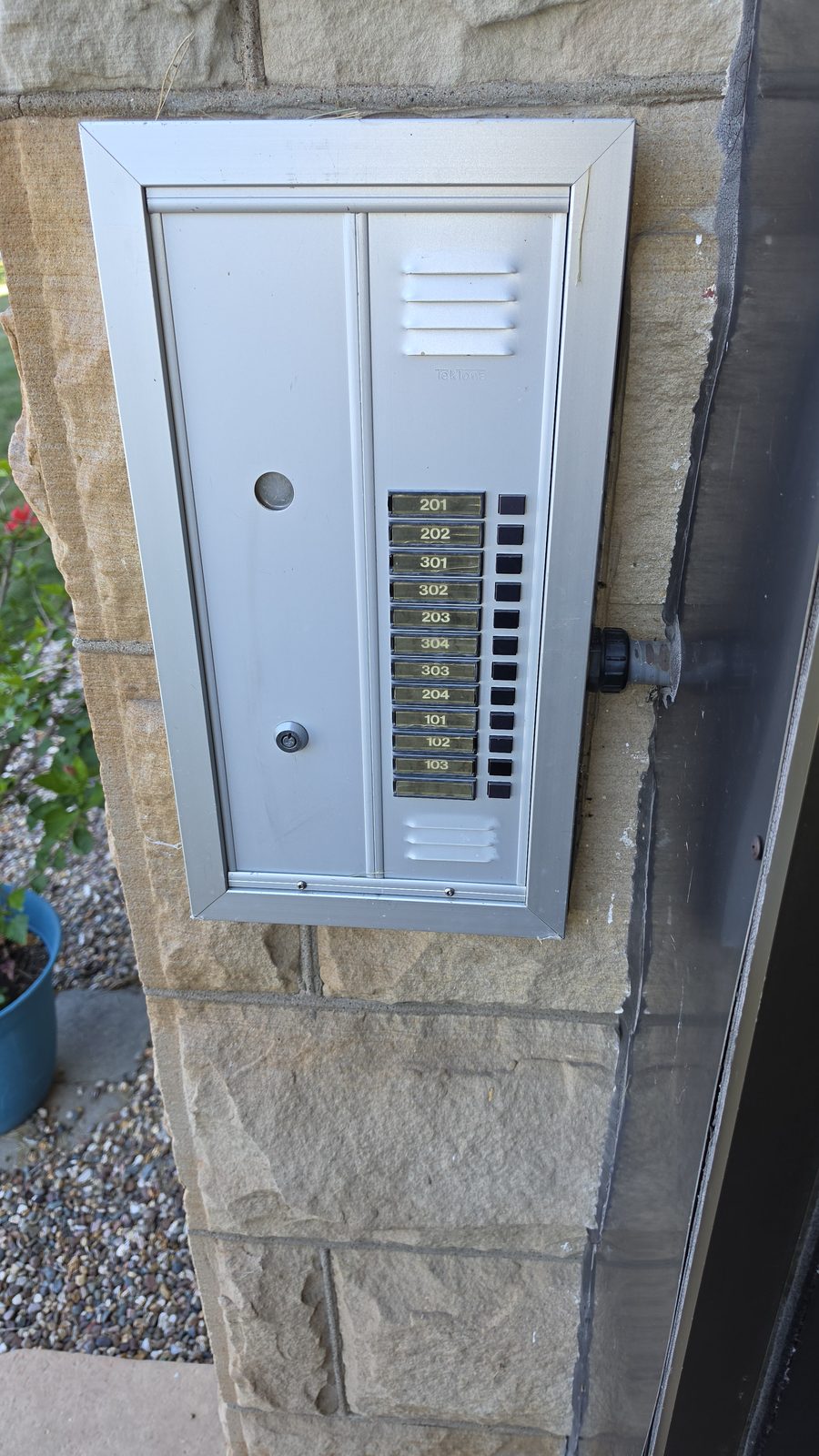
The front entrance
The old call panel on the stone pillar beside the front door: one button per apartment. Over the years the wiring behind it failed until it stopped doing the one job it exists for, letting a resident buzz a visitor in.
Field photos, this engagement. The client is kept general on purpose.
The situation
The building’s entry intercom went in back in 2014. Its wiring runs through limestone walls about 30 inches thick, and over the years it failed until a resident could no longer press a button and buzz a visitor in through the front door.
There is no documentation. No drawings, no wiring schedule, no notes from whoever installed it. Repairing that wiring in place means opening historic stone walls. That isn’t a repair, it’s demolition. So the job is to replace the intercom, not restore it.
Then the job grew. The same landlord asked me to rebuild their public website, and it became one web app with three sides: the public site, an app for residents, and an admin side that runs the system. Then the budget changed. The door work waits until after the first of the year. The website doesn’t.
What I did
First, I found out what is actually in the walls, because nobody wrote it down. I traced the undocumented conduit and wiring with a Fluke, run by run, to map what physically exists rather than what a manual assumes exists. Same person draws the diagram and runs the cable. In this case I drew the diagram after the fact, because the person who ran the cable left nothing behind.
Second, I diagnosed the failed hardware instead of shotgunning parts at it. The TekTone amp board, the Altronix 6062 timer, the RBK-5 relay, the power supplies — each one got tested and confirmed dead or alive before anything was ordered or pulled. The hand-labeled “BAD” board is a lead, not a conclusion. A recommendation nobody tests is just an opinion in a nicer font, and that applies to a marker note on a relay board as much as it applies to a slide deck.
Third, I designed the replacement. The core is an ESP32-based controller driving the door buzzer, doing the electromechanical work the failed relay board used to do, behind a system I can document and service. This is not a rip-and-replace of the whole building for its own sake. It is a deliberate answer to a specific failure, sized to a 20-unit building.
Fourth, I built the software layer. A tenant app plus an admin panel, so building management can add and remove people on each apartment’s profile without a service call every time a lease turns over. I designed it to expand to more buildings, because this landlord intends to grow their footprint, and a controller and app that only work for one building are a dead end I would rather not build.
Fifth, I chose the delivery layer honestly. WiFi, Bluetooth, or wired each have a real case, and the right answer depends on this building’s realities: the coverage, the stone walls, the tenants, the failure modes when the internet is down and someone still needs to get through the front door. I build infrastructure, so I could sell you a server. That is exactly why it means something when I say you do not need one — and it is why I weighed a wired fallback as seriously as the wireless options, instead of defaulting to whatever is easiest to demo.
Separately, the same landlord hired me to market their existing website and set up their SEO. Out of that work I proposed a desktop app so they can manage their own SEO and keywords, and reach into the door system’s database from the same tool — one piece of software, on their own machine, that touches both the thing that brings them tenants and the thing that lets those tenants live there.
What I proved before the pause
Maintenance requests become real tickets. A resident fills in a plain-language form in their app and it lands as a ticket on the staff side. I tested that end to end in a real browser. The form leads with a red warning: a fire or an emergency means call 911, not a ticket.
Staff work those requests inside the admin app, in a branded list instead of a third-party help-desk screen, confirmed in a browser signed in as property staff. One login gets staff into the service desk with no second password.
The sign-in screen is the client’s own, a branded page inside the app on their own sign-in system, with no third-party logos.
The public site is built and running on a test address: a page for each building, a clear way into the resident portal, and the local-search basics done properly.
A prototype door panel runs on the bench with the apartment directory and the guest-call screens: confirm, ring, cancel. It’s a prototype, not installed.
The internet options were written down and compared before anything was bought: a cable, a wireless hop, or satellite, and what powering each one really takes.
Three sides, one web app
I’m building all three as one progressive web app (PWA): a website that installs on a phone like an app, with no app store in between. One codebase, one brand, one header and footer, so the three sides don’t drift apart. The public site is the side that keeps moving during the pause.
Public site
A home page, a page for each building, contact, and a clear Resident Portal button, built to show up in local search.
Residents’ app
Sign-in, building info and office contact, and a plain-language maintenance form that turns a request into a real staff ticket. Later: the door calls their phone.
Admin side
The side that runs the system: a property overview, a building-health board styled like an old telephone switchboard with one lamp per apartment, and the maintenance-request list.
Why not just run cable?
The obvious fix is a wired internet line to each door. The provider quoted it as commercial service, about $250 a month per door, and that is only the monthly bill. Getting cable to two doors inside a 1900 limestone building is the expensive part.
Cable internet, and open the walls
- Plus $13,900 to $76,000 to build it first
- Two 30-inch limestone walls drilled through from outside
- Cable routed over occupied apartments
- More 30-inch block walls bored through inside
Cellular uplink, no walls touched
- No drilling into the limestone
- No cable on the historic facade
- Nothing routed through apartments
- About $342 of one-time hardware per door
The side-by-side comparison is at the top of this page. Jump to the comparison.
What the Comcast building work costs
Before Comcast can send the first bill, the cable has to get inside the building and reach both doors. In this building that means drilling through stone walls 30 inches thick and opening up the ceilings and walls of homes people live in. Here is every step, with a low and a high price.
| Step | Cost |
|---|---|
| Drill 8 holes through the 30-inch stone walls (2 from outside, 6 inside) | $900 to $6,050 |
| Fix the outside stone and seal the 2 cable holes | $650 to $5,500 |
| Patch stone and plaster on both sides of the 6 inside holes | $2,450 to $4,900 |
| Fire-seal every hole inside the walls | $180 to $570 |
| Run the 2 cables to the doors, inside a cover or pipe | $1,590 to $11,840 |
| Cut 12 to 30 holes in apartment ceilings and walls to pull the cable, then patch and paint them | $3,140 to $13,000 |
| Repaint whole ceilings so the patches don’t show | $300 to $5,600 |
| Plastic walls, floor covers and air cleaners to keep dust out of homes | $470 to $3,020 |
| Lead paint test and lead-safe work (the building is older than 1978) | $340 to $980 |
| Asbestos check before cutting into plaster | $600 to $1,500 |
| A contractor to schedule tenants and all the crews | $1,060 to $10,590 |
| Extra money for surprises in a 1900 stone building | $1,590 to $10,590 |
| Tariffs on building materials (+6% on the materials) | $190 to $950 |
| City of Quincy permits | $175 to $550 |
| Comcast install fee for 2 lines | $260 to $400 |
| Total, before the first Comcast bill | $13,900 to $76,000 |
The low number uses the cheapest price for every step. The high number uses the most expensive price for every step. A real bid would likely land in between. These are estimates from published price guides, city fee sheets and Comcast’s own posted fees. No contractor has bid this job yet. The tariff line adds 6% to the materials (about 30% of the work), based on Cushman & Wakefield’s April 2026 estimate that tariffs raised building material costs about 6% above 2024. Copper wire alone is up about 20% in a year (U.S. Bureau of Labor Statistics, August 2026).
Not in that total (it could cost even more)
- Comcast bringing its cable to the building. If Comcast’s line is not close enough, Comcast charges to extend it: often $5,000 to $50,000 or more per spot, paid up front.
- Removing asbestos or lead if the tests find any.
- An engineer to check the stone walls before drilling through them.
- Night or weekend work and rent credits for tenants whose homes get opened up.
Where these numbers come from
- https://eagletoolsupply.com/core-drilling/
- https://carolina-core-drill.com/carolina-core-drill_002.html
- https://springfieldconcretecutting.com/cost-of/concrete-core-drilling
- https://concretecuttingandcoringboston.com/blog/how-much-does-concrete-coring-and-cutting-cost/
- https://homeguide.com/costs/repair-brick-masonry-work-cost
- https://www.homewyse.com/services/cost_to_repair_stone.html
- https://www.deltatuckpointing.com/services/limestone-restoration/
- https://www.attackacrack.com/services/sewer-well-conduit-line-repair/
- http://mortarlab.com/mortartestingservices/articles/services.html
- https://chicagonetworksolutions.com/commercial-network-cable-installation/
- https://www.hillas.com/Categories/3M-Sealants/3M-Fire-Barrier-Sealant-FD-150-Blue-10-1-fl-oz-Cartridge-12-case.html
- https://www.suncoastpower.com/commercial-network-cabling-cost-per-drop/
- https://www.angi.com/articles/ethernet-installation-cost.htm
- https://thenetworkinstallers.com/blog/structured-cabling-pricing/
- https://craftsman-book.com/media/static/previews/2018_NEE_book_preview.pdf
- https://www.homeyou.com/il/plaster-repair-quincy-costs
- https://www.homewyse.com/services/cost_to_repair_wall_plaster.html
- https://www.homewyse.com/hwref/new4.php?lc=62301
- https://forums.mikeholt.com/threads/your-method-of-getting-a-cable-from-the-wall-to-the-ceiling.91687/
- https://homeguide.com/costs/cost-of-plastering-walls
- https://www.homeadvisor.com/cost/walls-and-ceilings/repair-a-wall/
- https://cleanwrap.net/interiorprotection/
- https://www.countbricks.com/post/air-scrubber-rental-chicago-lead-paint-removal
- https://19january2021snapshot.epa.gov/lead/how-much-will-it-cost-contractors-comply-rrp-rule_.html
- https://www.epa.gov/lead/renovation-repair-and-painting-program-contractors
- https://tetonenviro.com/how-much-does-asbestos-testing-cost/
- https://www.epa.gov/asbestos/overview-asbestos-national-emission-standards-hazardous-air-pollutants-neshap
- https://epa.illinois.gov/topics/air-quality/asbestos/house-or-apt.html
- https://www.homeadvisor.com/cost/additions-and-remodels/general-contractor-rates
- https://www.rsmeans.com/resources/estimating-best-practices-rsmeans-data
- https://www.quincyil.gov/files/assets/city/v/1/inspections/documents/826building-permit-fees-2018.pdf
- https://www.quincyil.gov/files/assets/city/v/2/inspections/documents/application-for-electrical-permit.pdf
- https://www.zoneomics.com/code/quincy-IL/chapter_10
- https://business.comcast.com/.well-known/broadband-labels
- https://business.comcast.com/~/media/business_comcast_com/PDFs/Terms%20Conditions%20SMB/Comcast%20Business%20Customer%20Terms%20and%20Conditions%20v%2046%2012225.pdf
What the $6,000 leaves out
That figure is just the service. To hide cable inside this building the way a wired system needs, it would also have to absorb:
- Two ingress points: two separate 30-inch limestone walls drilled clean through from outside.
- Cable routed over occupied apartments to reach both doors, disturbing the people who live there.
- More 30-inch block walls bored through inside the building to finish the runs.
- All the construction, patching and restoration a historic building demands.
The wireless plan needs none of it. Move the radio to the signal and bring the signal down the outside of the building, instead of moving the building.
The build plan when it resumes
None of this is ordered or installed. It’s the plan I’ll work from, and it all follows from one fact: thirty inches of limestone stops radio cold. A cell radio at the door or in the basement would be deaf.
So the internet comes in at the top. A sealed cellular radio sits on the roof, where it can actually hear the towers. A short cable drops into the attic, where an access point runs on power that should already be up there. The access point stays inside; a short antenna lead goes through the attic wall at the roofline, so the only thing outside up top is a small directional antenna aimed straight down the face of the building. The signal goes down the outside, line of sight, never through the stone.
At the entrance, the antenna that catches it hides inside a non-metal dome at the tip of a short metal cone, built into the top corner of the door faceplate and angled up. It sticks out about six inches, enough to see up the wall, with nothing to grab, pull or unscrew. The door end gets its power from inside the building, over the conduit that’s already in the wall. No cable goes up the historic facade, and nothing new gets drilled into the stone.
It’s the leading plan, not a finished one. Two checks come before any purchase: a signal survey at the roofline to pick the carrier and the mount point, and a site walk to confirm attic power and a clear line of sight down to the entrance. If the line of sight fails, the fallback is a cable in painted conduit down the wall. That’s the thing this plan exists to avoid, and it would still be a data cable for the door, never the old wired intercom coming back.
The building map is at the top of this page. Jump to the building map.
What the wireless plan costs
The hardware that carries internet from the roof to the door without touching the stone. The door panel and the basement switch are shared building equipment and aren’t repeated here.
| Part | What it does | Per door |
|---|---|---|
| Roofline cellular router | Catches the cell signal up high | $128 |
| Attic access point | Beams the signal down the face of the building | ~$60 |
| Concealed door antenna | Catches the signal at the door | $46 |
| Smoked dome cover | Hides and protects the antenna, nothing to grab | $28 |
| Power splitter | One cable powers the panel and the antenna | ~$20 |
| Material fabrication | Custom parts that hold the equipment and mount it at the door: the housing, the faceplate and the antenna cone. Still being designed | ~$60 |
| One-time hardware, per door | ~$342 | |
Planning estimates for one building with two entry doors. Nothing has been bought. Cell plan at $15 a month on current pricing, shared by both doors; introductory prices can rise, and at double the price it is still about 17× cheaper. Cable internet at $250 a month per line, two lines, as quoted. The router, door antenna and dome are confirmed retail prices; the access point, splitter and material fabrication (marked ~) are estimates not yet quoted, so the total is an estimate too. All before tax, shipping and labor. The Comcast building work is priced step by step in the side-by-side above.
What’s still open
Nothing is installed at the building, and nothing will be ordered during the pause. The roofline signal survey and the site walk come first; they decide the carrier, the mount point, and whether the line of sight works. The production door panel still has to be brought up and tested, and door calls to residents’ phones, video and audio aren’t built yet. Nothing in this build unlocks a door. That is its own phase, with its own approvals. On the software side, what’s left is sign-off from the owner and the landlord, a phone-layout pass, and moving the new website onto the client’s own domain.
Why it matters
The door work was in progress when the budget paused it. The conduit was not fully mapped yet, the controller was built on the bench but not installed, and the app was in development. I wrote this from inside the job, not after a clean finish.
It is one engagement, from one landlord, and it spans hardware, networking, physical install, software, and consulting. I traced conduit with a meter and I wrote the admin panel. Most people who can architect an ESP32 controller do not own a Fluke and pull cable, and most people who pull cable do not build the tenant-facing app that rides on top of it. Here it is the same mind on both ends. Whether the broken thing is an organization or a door buzzer, I do the same work: I find what is actually there, I test it instead of assuming it, and I build the fix so the next person has the map I never got.
Most intercom jobs go one of two ways: someone sells a system out of a catalog, or someone opens the walls. This building can’t take either. The stone that makes it worth saving is the same stone that blocks the signal.
So the work goes in order. Find out what’s actually there. Write the options down before buying anything. Test what can be tested. Say plainly what isn’t done. A recommendation nobody tests is just an opinion in a nicer font.
It’s one engagement across hardware, networking, physical install, software and consulting, and the same person traces the conduit with a meter and writes the admin panel. The pause doesn’t change the method. It’s also why this page says paused in plain words: a case study that only shows the good photos is just marketing.
Project status: the door system is on track to be completed in the client’s next fiscal cycle, after January 1, 2027. The website build continues in the meantime.